





Effects Expansion Pack for Final Cut Pro
Regular price $59.99 Sale price $19.99
Effects Expansion Pack for Final Cut Pro
A truly powerful add-on
Immerse yourself in the enhanced world of filmmaking by integrating the Effects Expansion Pack for Final Cut Pro. This revolutionary add-on not only grants you access to a diverse array of 66 potent creative controls seamlessly integrated into Final Cut Pro but also introduces a fresh arsenal of dynamic tools designed to elevate the craft for filmmakers of all skill levels.
Precise, professional control
Experience a new level of precision with tools that provide fine-tune controls usually reserved for industry professionals. The absence of a steep learning curve ensures that achieving a professional finish becomes an effortless endeavor. With this pack, take command of your creative process and infuse your projects with unparalleled precision and professionalism.
Elevate your creativity
Embark on a creative journey with five distinct categories: "3D Control," "Color Control," "Distort," "Glow," and "Style." This expansion pack empowers you to experiment and blend tools, offering a rich palette for crafting novel effects. Your creativity knows no bounds with this expansive range of tools. So, unleash your imagination and proudly display the visual wonders you can construct with the Effects Expansion Pack for Final Cut Pro. The possibilities are limitless—show us the extraordinary narratives you can build!
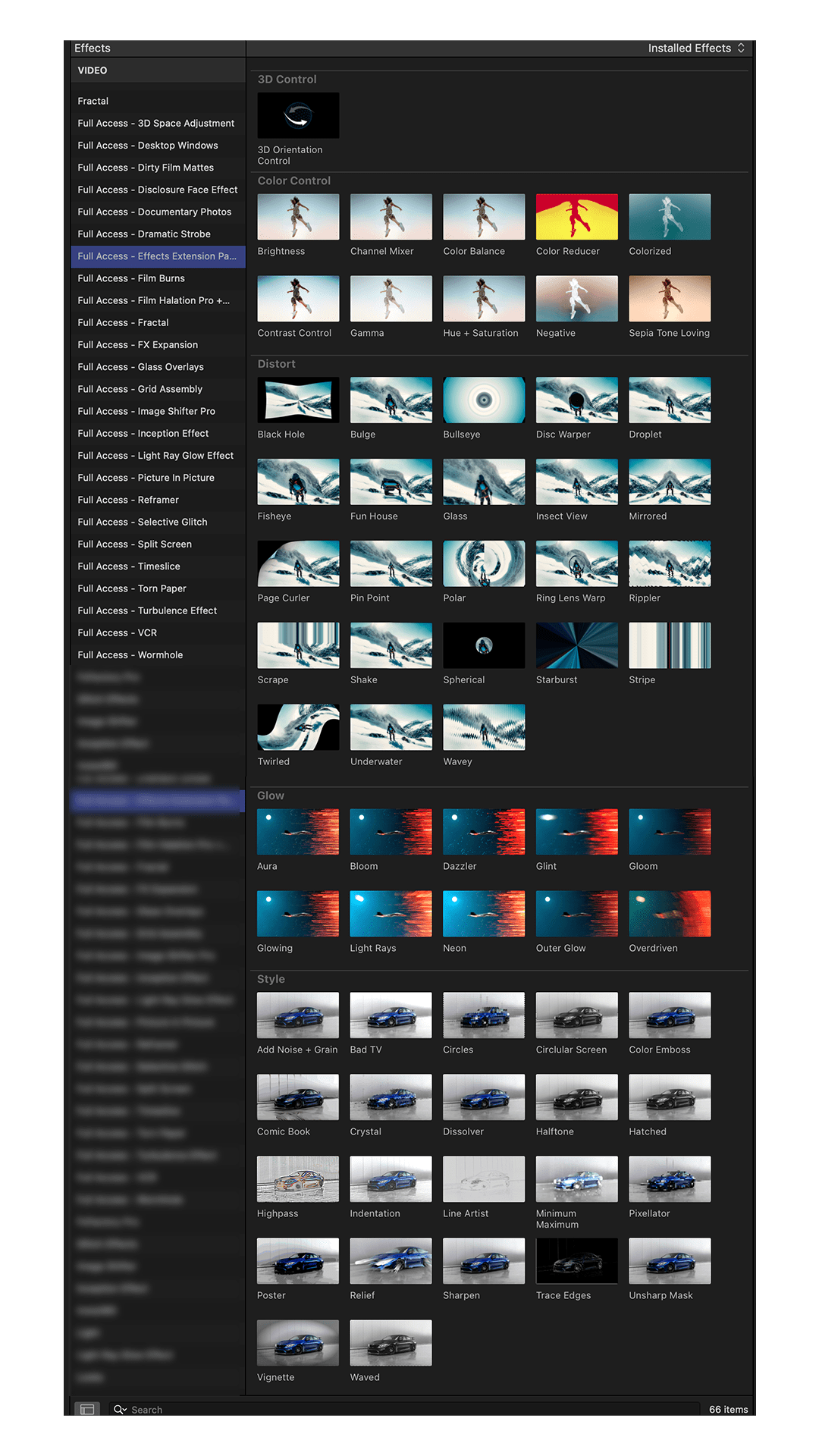
What's Included?
Download comes with step-by-step install instructions. Optomized for 16:9 and 9:16 projects.
System Requirements:
- Plugin requires Final Cut Pro Version 10.6.3 or later
- If you are not able to update your Final Cut Pro to the latest version, please check out this free software to convert your plugins to your current version.
© All Rights Reserved FCPX Full Access
**Strictly not for sharing or resale & Please use this original link to share**
Questions about Final Cut Pro plugins, answered.
Everything you need to install and use our Final Cut Pro effects, titles, transitions, generators, templates, LUTs and sound effects.
Our free Plugin Installer for Mac puts every plugin and LUT in the right folder for you.
Installing
How do I install Final Cut Pro plugins?
The quickest way is our free Plugin Installer: drop in your download and it puts every file in the right place. Prefer to do it by hand? Watch the short guide below.
Every download also includes a step-by-step PDF showing exactly which folder each plugin belongs in.
Where do Final Cut Pro plugins go on my Mac?
Final Cut Pro plugins live in your Movies folder, sorted by type:
Movies / Motion Templates / Titles
Movies / Motion Templates / Effects
Movies / Motion Templates / Transitions
Movies / Motion Templates / Generators
Restart Final Cut Pro and your new plugin appears in the matching browser.
How do I add LUTs to Final Cut Pro?
Drag the Custom LUT effect onto your clip, choose Custom LUT from the LUT menu in the inspector and pick the .cube file. Final Cut Pro remembers it for next time.
I can't see my plugin in Final Cut Pro. What do I do?
This is almost always a quick fix:
- Update Final Cut Pro. Each product lists the version it needs, and updates are free in the App Store.
- Check the folder. Titles go in Titles, Effects in Effects, and so on. Your download PDF shows the exact location.
- Restart Final Cut Pro so it picks up the new files.
Still stuck? The Plugin Installer sorts all of this automatically, or visit our support centre for more fixes.
Compatibility
Which version of Final Cut Pro do I need?
Each product page lists the version it's built for in its compatibility section. Running the latest version of Final Cut Pro means everything in our range works straight away, and updates are free for owners in the App Store.
Do I need Apple Motion?
No. Our plugins run directly inside Final Cut Pro. Every setting you need is right there in the inspector.
Do they work on Apple silicon Macs?
Yes. Our plugins run natively on M-series Macs as well as Intel Macs.
Will they work in Premiere Pro or DaVinci Resolve?
Our plugins, titles, transitions and generators are made for Final Cut Pro. Our LUTs and sound effects work in every editor, including Premiere Pro, DaVinci Resolve and Vegas Pro.
Orders and downloads
How do I get my download?
Your download link is emailed to you as soon as your order is complete. Can't find it? Check your spam or promotions folder, and our support centre has more help with downloads.
Are the free plugins really free?
Yes, completely. Check out at $0 and we email you the download link. Browse every free Final Cut Pro plugin.
What's in the Ultimate Bundle?
Every Final Cut Pro plugin we make: 115+ packs of transitions, effects, titles, templates and LUTs in one download for a single payment. No subscription, and it's yours to keep. See the Ultimate Bundle.
How can I use the products in my projects?
Every download includes a licence that sets out exactly how you can use it. Need cover for a whole team or a larger production? Ask us about a licence extension.
Why isn't my discount code working?
Some codes have an expiry date or can't be combined with another offer already on your cart. Join our mailing list for regular codes and new releases.
Can I swap or return a product?
As downloads are delivered instantly, digital products can't be returned once downloaded. Not sure a pack is right for you? Most have a free version you can try first. Our refund policy has the full details, and we always want to hear if something isn't right.
Explore Final Cut Pro plugins by type
Effects, titles, templates, transitions, generators, LUTs and sound effects, all made for editors.